Click OK, close the Registry Editor and restart the PC.
Double-click it and set the value data as 1 (and 0 for disabling it).
Right click in the blank area of the sub key you just created and create a new DWORD value by the name WriteProtect.
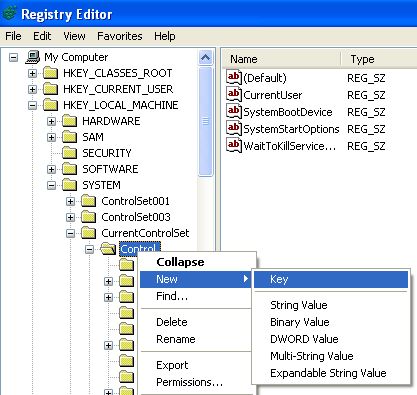
Locate the sub-key StorageDevicePolicies. If it doesn’t exist then create it first. Create a new key under Control by right clicking on it so that you don’t create it elsewhere by mistake (as shown in the above screenshot).
Browse to HKEY_LOCAL_MACHINE\SYSTEM\CurrentControlSet\Control\
This trick works only on XP SP2 and you need to have administrator privileges.
So I came to know of this trick of write protecting the drive so that I can safely copy things I want without the worry of virus being copied on my USB drive. Although you won’t be able to write any thing on your pen drive, its still very useful in case you want something to copy from your pen drive and don’t want to get infected. Before proceeding I must tell you that playing with the registry can be harmful for your Operating System (OS) and I advise you to take a backup of your registry in case anything goes wrong. Read how to .
Hello there! If you are new here, you might want to for updates on this topic.It happens with me many time that I had to copy some files from my pen drive to our college lab and the moment I plugged in my pen drive, it gets infected with dozens of viruses. Yes, its true that our college labs are too infected. Now before I can use the pen drive again, I need to make sure to clean it first so that the virus may not spread on more computers. I scan for my pen drive using NOD32 and no doubt it completely remove all traces of virus but it wastes my time as I always have over 2 GB of files that I carry with me all the time.

Комментариев нет:
Отправить комментарий